
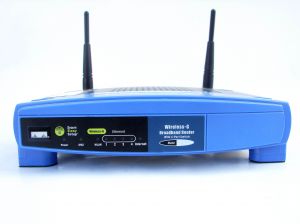
 If you own a Linksys Wireless router, it is strongly recommended that you upgrade the firmware to a latest version, which may resolve lot of bugs including random dropping of wireless connections. This article explains how to upgrade to the latest firmware on your Linksys wireless router.
Also, make sure you’ve secured your wireless as mentioned in 6 Steps to Secure Your Home Wireless Network
1. Get your Wireless Router Model Number and Version Number
On the back of your wireless router, you’ll see both model number and version number for your specific linksys wireless router. The example below shows the model and version of a WRT54G wireless router.

Fig: Version Number of Linksys-Cisco WRT54GL Wireless-G Broadband Router (Compatible with Linux)
2. Download Latest Linksys Wireless Router Firmware
Go to linksys.com -> Support -> Enter your wireless router model number (for example, WRT54GS) -> Click on ‘Get Downloads’ -> Select Version number for your wireless router -> Click on the download link under firmware section, which typically shows the following information.
- Release Date: For example, 07/01/2008
- Firmware Version Number: For example, Ver.1.52.6
- Download Size and Link. for example, 1.66 MB
- Release Notes for the new firmware
Direct Download link for :
- WRT54GS firmware
- WRT54G firmware
- WRT54G2 firmware
- WRT54GL firmware
- WRT160N firmware
- WRT110 firmware
- WRT600N firmware
3. Take a Backup of Linksys Wireless Configuration
Before the upgrade, take a backup of the current Linksys Wireless Configuration. From the web interface, go to Administration -> Config Management -> Backup -> Config.bin, Save this file to some location on your local machine.
4. Upgrade the Linksys Wireless Firmware
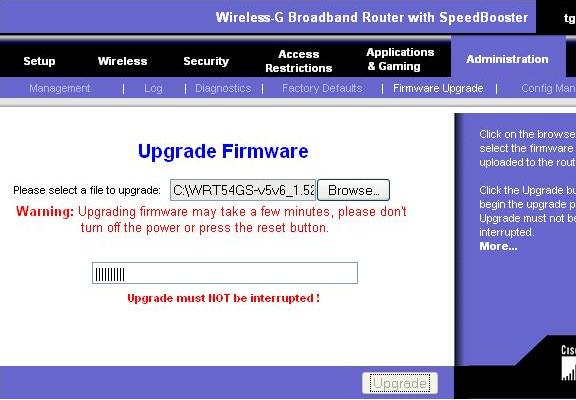
From the web interface, go to Administration -> Firmware Upgrade -> Choose the latest file that you downloaded above -> Click on Upgrade.
Once the upgrade started, do not click on any other link on the web interface. Just wait until the upgrade is completed.
Once you’ve completed the upgrade, verify your new firmware version to make sure the upgrade was successfully completed. In my case, following is the firmware version.
- Before the upgrade old Firmware Version: v1.50.5
- AFter upgrade Firmware Version: v1.52.5






Comments on this entry are closed.
actually, i would rather give an advice to “upgrade” to dd-wrt 😉 all my problems were solved after i did so over a year ago. and i also got new awesome features, one of which makes me able to have internet right now – the wireless bridge 😉 and this works waay faster and more stable than a normal wifi adapter (900-1000kbps direct wifi connection on my laptop vs. 4+mbps on my pc over the wireless bridge).
I’d agree with Ku here. I brought both of our routers up to dd-wrt and never looked back.
@Ku, @d,
Yes. I agree with you. Thanks for your feedback. I’ll probably write another article later about DD-WRT.
For those who don’t know about DD-WRT, it is a open source linux based firmware for the wireless router.
i bricked a 300n…can u help or know of any software that can be used for de-bricking…had power failure at the last moment.
Hi Ramesh, I am amzaed you are not using TOMATO firmware 🙂
or may DDWRT or OpenWRT, Why so ?
@uBigDummy,
I believe you are talking about Linksys WRT300N Router. You have to call Linksys customer support for that. If you find an answer, share it with me.
@Mohit,
I’m running DDWRT on one of my router. I’ve never used TOMATO firmware. Just for it’s name, I should play around with it. 🙂
For those, who are not aware of it, Tomato firmware is a small, lean and simple replacement firmware for Linksys’ WRT54G/GL/GS, Buffalo WHR-G54S/WHR-HP-G54 and other Broadcom-based routers .
Thanks for article,
DD-WRT with linksys working best for me. and i m waiting for your article on DD-WRT.
I have a WAP54G V2 Access point. I have downloaded the latest firmware from the linksys site. i type in the router’s IP address in the address bar ( computer is connect to the router with the ethernet wire), but then explorer starts to searching the net and does not open the web based utility. Am i missing something very basic ?
I attempted to upgrade the firmware for my WRT54GP2 by following the instructions. However, browsed to the download location of the bin file, then began the upgrade, the router username/password verification box kept continually popping up. The upgrade progress bar continued to move and got to a point where it says to please wait for upgrade (or something to that effect), then a big red 404 unauthorized user page pops up, which says I have entered the wrong username/password or IE does not know how to obtain information from this request.
I tried this two different times and was never able to update my firmware. Could I perhaps try this using another browser?
Thanks
Purchased Cisco E-3000 Dual-Band, Wireless Router…$200.00! Purchased because I have several Wireless Devices & wished to avoid Frequency Issues, Interferences.
Set-up was a breeze… ran super-fast!!! Then, about a half-hour later…Big Trouble!!!
The unit began to smell, a burnt smell! Why, Ive no idea. Power is 110v…No power problems &, I’m protected with a APC unit! Have several adaptors plugged-in to the unit without any problems.
Returned the E-3000 to Cisco…received a replacement…Wham! Same thing happened again???
Returned the 2nd unit…requested a Different Router…one that has been in the field & well tested! Cisco said…Sorry! So, awaiting another E-3000!!!
I’ll not install the New E-3000 untill I am confident that it won’t burn-up once again!
Please advise if anyone out there has had similar issues with the E-3000!
Thanks,
William
Really helpful site! It was easy to follow and helped me upgrade my Linksys so it would be compatible with my new Tivo. Thank you so much for creating this article.
Thanks! I did not upgrade my firmware for nearly 3 years and you helped changed that!
I have a WRT54G V8. I have downloaded the latest firmware from the linksys site ver 8.2.08. i type in the router’s IP address in the address bar ( computer is connect to the router with the ethernet wire), but then explorer starts to searching the net and does not open the web based utility. What can I do to restore my Router to a previous state using linux OS or Windows.
Very good instructions. This is another reason why the Internet help SO much!!
Joe
I clicked on the link for my router and it took me to the general website. I did a search for my router downloads & a link came up. I clicked it and it wanted me to browse MY computer. That didn’t make any sense to me whatsoever. Most times when I go to download an upgrade it comes from the WEBSITE and NOT my computer.
Anyone have a direct link where I can download the firmware upgrade from the website?
I just upgraded the firmware for my linksys wrt54g. I went to the linksys website and all necessary information and the download file are provided. A detailed set of instructions are available, and I advise that they be followed carefully. I printed out a copy to make the process easier.
I created a folder in “My Documents” and named it Linksys. I saved the downloads in the folder to simplify upgrade process. The process worked without difficulty. Linksys has provided a very user friendly and detailed set of instructions.
Linksys recommends resetting the router and then restoring the config from the backup but I did not and I wonder if that step is truly necessary, as everything seems to be working fine after the firmware upgrade and the latest version of the firmware is displayed.
I have a Linksys Model WRT54GS V5
and upgraded firmware from 1.20.5 to 1.52.8
Is my router out of date?
Are the newer ones much better or faster?
Thanks for a great set of instructions!
Guys, i have WRT54G v 5. The linksys firmware sucks. As far I know, Tomato doesnt support beyond v4. Can u suggest some way out??
I have a CISCP linksys, WRT54G2v 1.5. When I access web admin, it only throws garbage (html corrupted) to screen. How can y upgrade firmware if I cannot access the web admin?
Claudio
People are talking about upgrading to DD-WRT as if it was so easy. There’s totally nothing easy about it! And people don’t even mention that you can risk bricking your router while doing it. Unless you’re having major problems with Linksys firmware, just stick to it. DD-WRT is an advanced upgrade option.
Great article! I let my firmware upgrades go by the wayside but finally made the updates today. I can already see a difference in my internet. Your steps made it super easy to take care of. Thanks!
I tryed to instal tomato and got impatient and screwed it up. Is there a way to recover my router? Please say yes!
Just did the upgrade for my WRT54G v8 router. I thought it all went well, but…
After the install I reset the router (which is what the linksys instructions told me to do). Now I believe the name of my network has changed to “Linksys”. I say “believe” because I can’t find my old wireless network name any more and I’ve never had access to a “Linksys” network. Also when I try to log into to the Linksys website it doesn’t recognize my wireless name and password anymore!!! Does this mean I have to call Linksys to get a log in password again?
The default username password is admin/admin.
Use that after a reset.
Hi, I am using the Linksys-Cisco WRT54GL wifi router. the router was initialy configured by tadaa wireless and the router ip is 10.10.10.1 and connection name is tadaa.lan.
The user id and password for the admin page is lost. To recover the password I tried reset. tried all options still the router ip is 10.10.10.1 and connection name is tadaa.lan.
I tried the default password “admin”. Can you please help me in recovering the password or resetting the router?
Hello,
I have a wrt54g v5. I never updated the firmware, but I did download and store the firmware upgrade from 2007 onto my computer. I finally wanted to upgrade the firmware with the latest version, however linksys no longer provides it on their website for version 5’s and higher. Does anyone know of a copy of this saved at another site that I can download?
Thanks.
@Charles
WRT54G v5 (known latest) firmware: here
There are other locations. I even saved a copy just in case.
—
Yep, the ones at Linksys have started purging the firmware for older routers from their site in 2011. They continue to do this for more recent routers that go EOL. Basically, (about) anything that is before the E series for routers (as of this posting). Some of the following routers:
BEFSR11, BEFSR41, BEFSRU311, other BEF series (all versions) [no surprise; very old and vulnerable router anyway. I own v1 and v2 hardware versions of this router and have found almost all firmware for it…] (2012)
WRT54G (v5 – v8.2) (2012) Yes, there’s an exception! v1 to v4 are still on their site! [I own a v8 hardware version of this router and managed to obtain all the firmware for v8 before the purge]
WRT54G2 (all versions) (2012)
WRT54GX, WRT54GX2, WRT54GX4 (all versions) (2012)
WRT100N (2011)
WRT120N (all versions) (2011?)
WRT150N (all versions) (2011) [I have all the firmware for that router except 1.00.5 of course, and GPL code for 1.00.5]
WRT160N (all versions) (2012) [I have the released and beta firmware for v1 of that router; works with WRT150N as well]
WRT300N (all versions) (2012)
WRT320N (all versions) (2012)
WRT350N (all versions) (2012)
WRT400N (all versions) (2012)
WRT600N (all versions) (2012)
WRT610N (all versions) (2012)
…some more older obscure routers as well…
Interesting thing is they’re still making firmware for WRT54GL. o.O You’re technically meant to install third-party firmware on that router. That, and it’s pretty old, anyway, from the WRT54G v5 era.
guys,i need help.i have a problem with my wrt54g, if i go to router settings the i cannot load everything.is it firmware problem?tnx
I’m using a WRT54G V.6 Router and I cannot find out where to get the most recent firmware for it. I’ve also been experiencing a problem over the last year or so. Sometimes, the internet completely drops at certain times in the day..well last year..around 3-6am..afterwards, it wouldn’t disconnect during the day. Then, recently, the last week or so, it just keeps disconnecting 5-10 times a day or so..usually every hour or two..the only way to restore internet connectivity is to unplug/replug in the router wire. Is the router going bad, or does it just need new firmware? I am using the net without the router for the last hour to test it..obviously it hasn’t been long enough to tell anything yet..but assuming I don’t lose connectivity, should I bother updating the firmware, or should I just replace the router with a new one? It’s getting extremely irritating.
Saintbane (April 8, 2014 at 11:35 am) >>
Set aside money for a new router BUT in meantime flash old router with DD-WRT for V6 routers. I have a V6 router and it works great with DD-WRT. I think DD-WRT is only 3rd party firmware available for V6 WRT54G
Guys I have WRT54G with ver. 7 Now my question is where is latest firmware to download so that I can upgrade that shit.
Guys can anyone share the latest firmware for Linksys router WRT54G, i have searched everywhere still i am unable to find it, all the links which which shared the latest firm ware is now closed. Your help will be greatly appreciated.