
As part of the contest that was conducted a while back, I got around 200 responses from the geeky readers who choose their favorite Linux text editor.
Based on this data, the top spot in the best Linux text editor goes to…
Vi / Vim Editor
Vim won by a huge margin and I don’t think this is surprise to anybody. If you are new to any of the Linux text editors listed in the top 5, read the rest of the article to understand little bit more about those editors.
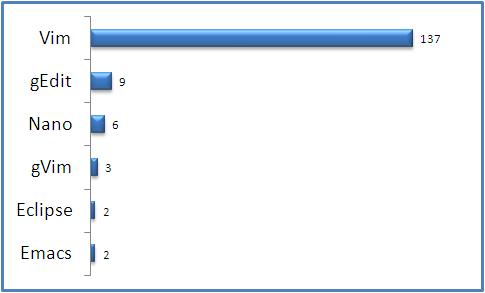
Fig: Favorite Linux Text Editor Voting Results
1. Vim Editor

- Home Page: http://www.vim.org/
- Author: Bram Moolenaar
- Latest Stable Version: Vim 7.2
- Written in: C and Vim script
- Operating System: Cross-platform (Unix, Linux and Windows)
- Read more about Vim Editor at Wikipedia
- Read our on-going Vi / Vim Tips and Tricks series for some awesome Vim Hacks
Vim 101 Hacks eBook contains 101 practical examples on various advanced Vim features that will make you fast and productive in the Vim editor.
2. gEdit Editor

gedit is the default text editor for the GNOME desktop environment. This is a UTF-8 compatible text editor.
- Home Page: http://projects.gnome.org/gedit/
- Latest Stable Release: 2.26.2
- Written in: C, Python
- Operating System: Cross-platform
- Read more about gEdit at Wikipedia
3. Nano Editor
- Home Page: http://www.nano-editor.org/
- Latest Stable Release: 2.0.9
- Read more about Nano editor
4. gVim Editor
- Home Page: http://vimdoc.sourceforge.net/htmldoc/gui.html
- gVim is the graphical version of the famous Vim editor
5. Emacs Editor

- Home Page: http://www.gnu.org/software/emacs/
- Current Stable Release: 22.3
- First Release of Emacs was in the year 1976
- Written in C and Emacs lisp
- Operating System: Cross-platform
- Read more about Emacs Editor at Wikipedi





 My name is Ramesh Natarajan. I will be posting instruction guides, how-to, troubleshooting tips and tricks on Linux, database, hardware, security and web. My focus is to write articles that will either teach you or help you resolve a problem. Read more about
Comments on this entry are closed.
my favorites:
FreeBSD: ee
Linux: nano
🙂
Ah, but you forgot jedit!
http://www.jedit.org/
Vim is amazing. Nano, and especially gEdit, are a lot more convenient for beginning Linux users.
I did not see http://vim.wikia.com mentioned on your list of sites. It’s got great vim tips, scripts, and such.
TEA text editor gets my vote! It’s a feature-rich GUI text editor, don’t know how I could live without it.
http://tea-editor.sourceforge.net/
My favorite is Kate/Kwrite.
Looks like you got around 158 responses, which is a far cry from 200.
I’m all for rounding, but you basically added an additional 25% to the true figure.
I can’t believe it… only two votes for emacs?? lol
Anybody knows geany? My favorite!
vim rocks.
I like Vim and Nedit.
scite should have been in there somewhere
My choices are Vim and Gedit
It’s always difficult to cover text editors. There are almost as many editors are there are people who use them. Plus, the majority of techies tent to use more than one editor for different types of tasks. For example;
I use vim for the majority of my text editing but I also use pico/nano for email as (al)pine is The One. It would not be uncommon for me to use gedit, nedit or mousepad either.
@NetSpider, @coral, @Michael, @Zeke Krahlin, @Binny V A, @hans berger, @Lakshmanan, @Rick, @Inkpad, @Arun Shivaram, @Joe Klemmer,
Thanks for sharing your favorite editor with us.
For those who are interested, following are the different editors mentioned in the previous comments that are not listed in the “top 5” of this article.
FreeBSD ee Editor
JEdit
TEA Text Editor
Kate / KWrite Editor
Geany Editor
NEdit is a multi-purpose text editor for the X Window System
A free source code editor for Win32 and X
Pico Text Editor
Mousepad Editor
Kate opens my list,
I am also starting to use Geanny, alltough this is more a lightweight IDE, therefore quite convenient.
I have also been using Emacs for C development, but I am now trying to get into Perl and I find other editors more useful.
@runlevel0, Looks like you are using multiple editors. Just playing around with all these editors can be lot of fun.
This is for newbies,
I like vim, personally i feel for newbies, they should stick to an editor(i preferred vim),learn it thoroughly, explore and exploit it , add plug ins and customize it for your needs, see if you could do almost most of the work done(this is a gradual process, need lot of patients, but worthy).
If any editor doesn’t allow you do the above, then that seems to be not a better editor.
if you have a lot to do with editor and have an hacking attitude use vim/emacs, they have these common features
->few key storkes
->interface to shell, very rich inbuilt commands for text editing
->wonderful plug ins and help over net,
->good performance, almost on UNIX machine you could at least find a vi.
->along with plunging like c vim, c tags, c scope, and interface with gdb makes it perfect for development.
but you should also get to know and get updated about other editors to see if your editor is not falling behind, if yes then try to get that features in yours,
Vi will actually be the clear winner as it’s always installed in whatever version of Linux or Unix based OS. If you don’t know vi, you will be paralyzed in critical situations where the OS is stripped down to the minimum with vi the only way to edit.
There is no editors from KDE. I prefere Kate or kWrite, which are fast and simple, but powerful.
GEdit is nice one. Love its’ tabbed interface and syntax highlighting. For barebone, notepad like interface, I use mousepad.
Obviously followers of Ramesh are Vim fans. Emacs is the the mentally disturbed. Eclipse is for developers who have too much RAM or CPU. Vi and nano is always there for you. Vim rules them all!
The best is gvim then vim
I’d like to point out that ‘ed’ is the standard editor.
1’000 Karma Points for cracking me up…
MattE, “…Emacs is for the mentally disturbed.” Quite so. Emacs was my first editor after leaving vax/vms for att unix. Anybody remember getting mail and (the real) ‘news’ on Tin as a character window through Emacs? Or muttering in frustration at not finding Emacs, so typing $ vi -o.
fionn, who reminds us that ed is THE editor, gets a laugh at being one of those hard arsed types who actually likes writing awk scripts. Probably several before lunchtime.
Nedit … a hangover from Irix days but still useful and good.
Emacs is suitable to lisp and ruby~
Vi and Vim is used to code like C/C++
Say gEdit is used to HTML, JS .etc.
Vim on console,
Emacs or Geany on gui
emacs is the best. PERIOD.
Vim? Seriously? Do people pick this specifically because they want to make sure that people’s initial experience of Linux-type systems is as off-putting as possible?
If you still think of GUIs and user interface design as new-fangled fripperies, not fit for proper computer folks, then okay – VIM or EMACS are completely reasonable choices in that context. If you’re used to being able to figure out how to do anything at all in an application without having to look it up, or if you ever find yourself recommending text editors for anyone who isn’t a massive old-school geek, please, nano, every time. Or Geany if you have the option of using some kind of windowing system.
Mt McKinley is not the highest mountain in the world. But it has just about the largest distance from base to top. In similar fashion, vi/vim has the largest gap between availability (everywhere) and usability (practically non-existent, unintuitive, etc.) Emacs is not much better. @Fergus has it right: both of those are dinosaurs.
Which editor, besides those, is the most generally findable/installable/usable without a lot of training? One GUI-based, of course. (What used to be called WYSIWYG.) If nano or Geany is easy to get and install, fine, as long as the process of getting it installed and usable is not worse than the curve to learn one of the old dinosaurs.
I’d like to understand why so meany people chose win
because they are clearly not the best to use them when you begin with linux but have a completely inuintitive way of functionning and saying it’s the best because it’s on every unix system dooooh
i’m sure many hours are spent in training people in these useful stuff whereas it would be easy to add a small text editor and if you want efficiency you still have vi
only eclipse
Vim is good one……
Another vote for Geany!
I gotta go with Fergus on this one. While tinkerers and those with guru meditation syndrome might like vim, vi, emacs, nano whatall… reality is a GUI based editor is so so so much more intuitive AND more so productive.
Linux is alive in various flavors much in the same way FreeBSD has lived. Apple took BSD and made iOS from it. Linux sits on many many web servers, servers and yes… even home users. But, when comparing how many average folks use a computer both WIndows and Mac’s win hands down.
Using a computer means the ability to use it. Period. Not have to go through craploads of crap to do so.
I am a software engineer, C++,C#, VB, PHP etc along w/ MSSQL, MySQL, Oracle etc.
I just set up a dell server for some software I am coding up in PHP (unfortunately) mainly so I can do load tests under CentOS. What FUN! It took me only 9 hours from start to finish to get the whole rig development ready. Cool huh?
In WIndows it’d taken about 2 hours that being the time to install and configure Visual Studio, .NET and MSSQL.
Its no wonder that Linux admirer’s like to remember 7000 commands and use things like vim and the reason is they never have really used something thats up to todays mark. Try a fully integrated environment like Visual Studio say with C++ as a fair comparison. I can get easily 400-500% more productive. Everything I need in one place, all nice and consistent to use.
I have to do the linux stuff due to what I am working on. As a coder of 30 years now and WAY back working with unix I see not much has changed in 30 years. While the rest of the computing world stepped away from DOS and into the operating environments that have moved computing, gaming, portable devices forward some still love to love what is really painful to adore.
SO why not use MicroJunks stuff on my project then? Simple. I need maximum bang from the server bucks. Linux is far far faster than the Microsoft technologies as the paradigm is different. Microsoft is and still does count on hardware becoming a dime a dozen and speed/storage becoming a non-issue. They are on the money with that btw. The plan is no matter if its a home PC, intelligent TV, tablet, phone, laptop or game machine everything is accessible and usable via any device.
Eclipse is a very good editor in comparison to anything else I have saw mentioned. No surprise, java developers.
C++ and java run the enterprise world (not just online btw).
While PHP is what it is and oodles of coders think its just the “BEST” its not. It in fact is written in C++ as is Apache, mySQL etc. That in itself ought make a want to be coder go, “oh”.
Host firms love PHP, I know, I worked for two. They love it because any site that develops real traffic ALWAYS trys the “I need buy a faster host plan” VPS, dedicated etc to try and make things keep working… Yet, same people bitch about Windows Server speed. Amazing, wanting play “sides” yet never having tried the other side.
Microsoft’s stuff is scalable, all of it… and in fact is far far more robust. One can code real client/server apps in Visual Studio with relative ease. One environment for development. C++ or Java based solutions will run rings around .NET or PHP assuming decent code.
So what?
Well… this what. Whats funny is here is a blog about what editor is best and the editor people think is best is vim? What do you have sitting on your desktop? A i486 DOS PC?
Programmers above who really think usability of an editor(or any tool) equals to how easy it is to learn (and everyone with another preference is a masochistic moron) – consider Notepad.exe and BASIC or Logo as your programming language.
For a non-developer or end user spending little time with a particular tool, of course intuitiveness is the primary concern.. as the learning investment is just not worth it.
For the rest of us, usability of a has more to do with productivity than intuitiveness(~ease to learn).
This applies to power-tools like a dev editors, spending most of our time there makes the steeper learning curve a good compromise. As always, usability is a subjective notion, what’s great at the beginning (eg point and click) gets in the way very quickly, and “insane” shortcuts are turning into life saver.
Long live Emacs, Vim and even Eclipse!
I use jedit
Why shoot yourself in the foot with a kludgey wordstar compatible editor from 1979, use Geanie.
Geanie uses all standard international and MS keystroke combinations, instead of 40 year old mealy mush, It also does all the terminal handling, and it makes EMACS and VIM look like they just stepped out of the cow barn after wrestling with cows. MOO!!
I’m writing a novel and tend to use Geany for writing and Cherry Tree note taking software for organising the scenes and chapters.
I tried Vim but it fails on a couple of things. Firstly, It can’t export as plain text, it can only export as html or some other obscure format, I forget what it is. Geany can export as plain text.
Secondly, I can’t highlight a piece of text and move it somewhere else with my mouse, like I can with Geany.
I’ve also tried Gedit, Kate, Kwrite, Ted and just about every other text editor and word processor there is out there.
The biggest failing with them all is, when you launch the software you have to re-open the document you were working on again.
When I launch Geany, the document is there, ready for me to work on.
If I could get Vim to export as plain text I would use it more often because it’s light and portable, it looks as if it’s only 50kb in size and I can use it off a usb stick.
Dear @rg,
After reading your long crappy comment, I am really in doubt about your experience you mentioned.
Windows actually was created for dummy(no-voice) users. Linux are for servers. GUI eats the system resources like popcorn and geeks don’t need that. So Linux is used where reals geeks work like web servers and Super-computers. Your Windows have no work there,it’s only for non-geek users.
In command line I can login on 200 servers at a time and can run command at a time. Go, and do the same in GUI. In bash I can maximize my server uptime and productivity by not wasting my resources on GUI.
Go and try hacking or pen-testing via your Windows.
Thing is that all you can do with Windows, I can do that on bash CLI. But you can only do 30-40% of job on Windows GUI of bash CLI.
I doubt your experience because you took 9 hours for that simple thing. I work on AWS cloud with 166 CentOS servers. I can configure all servers SIMULTANEOUSLY just in 3 hours through CLI.
*XEmacs* has been my favorite editor since 1992, and it runs on a variety of platforms (I’m using it and have used it in the past on Linux, HP-UX, Solaris, Windows, Mac OS X). As a computational linguist, I’ve always found it useful to have powerful macro capabilities and a full LISP interpreter built in for automating tasks like text processing (e.g. for editing lexicons). XEmacs has a shell mode, VM for email, and the GNUS news reader built in, so like your Web browser, you will never really close it.
Recently, I’m enjoying Sublime for note taking and coding as well.
Fionn, that was too subtle. I’m not confident enough of these posters, e.g. the credential wrangler, have seen this . That post, but come to think of it ed as well, has brought me near tears more than once.
My two cents–I’m a vi user, so I use vim and gvim (depending mostly on whether I’m coming from a gui interface.) I’d say most days I use both of them. Discussing GUI editors per se is off-topic IMO, and would make another interesting poll. Development environments are way off topic. OSes are, well, you get the idea.
vim for in-terminal editing
sublime for a GUI interface editor (much better than g-edit, the improved ctrl+f is worth it enough)
@Paul Gresham
I realize Paul will probably never see this comment, but just to make something clear for anyone who reads Paul’s comment. The editor vim does indeed save documents in plain text. In fact, as far as I am aware, like most text editors, that’s the only format it can save documents in. Everything else is just the extension you use to name your file.
Yes, you can save a file with an html extension, but html files are plain text files; the extension just lets programs know that the file is expected to function as html code. Saving something as plain text is as simple as naming the file with a txt extension (in Windows anyway; in Linux no extension can also work)
The only stumbling block you may run into is that Unix/Linux uses a line feed as an end of line while Windows/DOS expects a carriage return and a line feed.
kate
notepad++ ran over wine
Never know how to exit vim except close the terminal. 🙂
Nano is my best friend when I have no GUI, then Sublime Text for GUI.
Hi,
any one tell me which Editor best for Python Script in Linux CLI mode not gui for save indentation.
People can say what they wan’t but vim and emacs are by far the two best text editors/environments ever made for developing, programming, editing a config file or just plain writing a text file. I think we all know that nothing else really even compares to those two. Especially for development if you are using any programming language with the exception of Microsoft garbage and possibly Java and you are not using vim or emacs you are seriously doing yourself a disservice. Or if your a systems admin knowing vi is an essential skill, even if your are just someone who enjoys learning about computers or writes a lot of text in my opinion it is well worth it to learn vim or emacs, do not let anyone fool you these two pieces of software are more powerful and capable then any so called “modern” GUI equivalant IDE or text editor both vim and emacs are complete environments with built in programming languages, full fledged macro support, thousands of plugins and much much more.
To be honest I’m a loyal vim user but I would probably have to give the advantage to emacs as far as extend ability goes I just prefer vims modal editing over emacs and it’s true both editors take an investment of time to learn, but learning the basics is not really all that difficult. Spend 30mins to an hour and either start vim-tutor in vim or emacs built in tutorial and I guarantee you in less than an hour you will be able to use either editor for all your basic text editing needs. And from there the sky is the limit that one piece of software will serve you in many uses need a text editor, need an IDE, need a file browser, need a email client (mutt can use vim), need an scp/sftp client and virtually anything else can be done so IMHO its well worth it to learn.
Emacs last?? I don’t buy that, I’ve been using Linux and Vim for programming for 3 years now and I’ve seen A LOT more people using Emacs than using nano and Gedit, there is probably as many people using Emacs as there is using Vim…