
RAID stands for Redundant Array of Inexpensive (Independent) Disks.
On most situations you will be using one of the following four levels of RAIDs.
- RAID 0
- RAID 1
- RAID 5
- RAID 10 (also known as RAID 1+0)
This article explains the main difference between these raid levels along with an easy to understand diagram.
In all the diagrams mentioned below:
- A, B, C, D, E and F – represents blocks
- p1, p2, and p3 – represents parity
RAID LEVEL 0
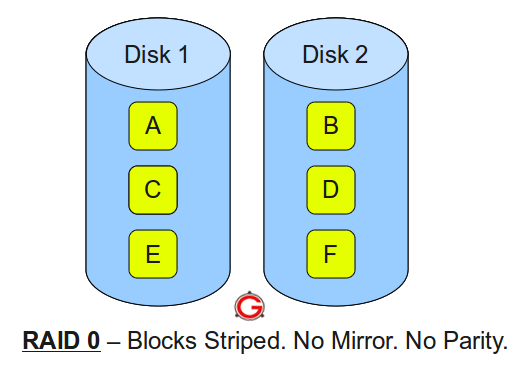
Following are the key points to remember for RAID level 0.
- Minimum 2 disks.
- Excellent performance ( as blocks are striped ).
- No redundancy ( no mirror, no parity ).
- Don’t use this for any critical system.
RAID LEVEL 1
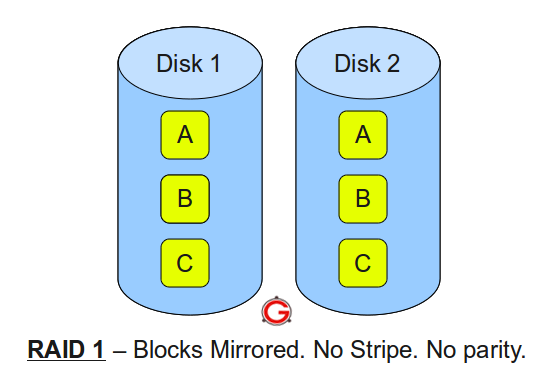 Following are the key points to remember for RAID level 1.
- Minimum 2 disks.
- Good performance ( no striping. no parity ).
- Excellent redundancy ( as blocks are mirrored ).
RAID LEVEL 5
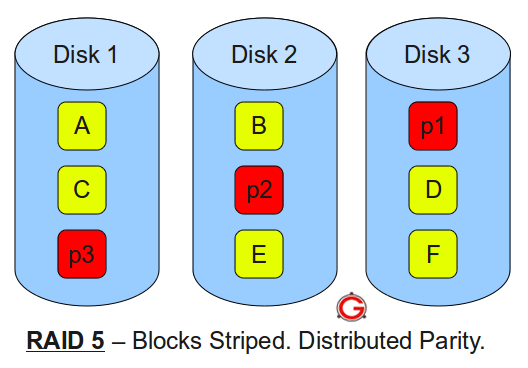
Following are the key points to remember for RAID level 5.
- Minimum 3 disks.
- Good performance ( as blocks are striped ).
- Good redundancy ( distributed parity ).
- Best cost effective option providing both performance and redundancy. Use this for DB that is heavily read oriented. Write operations will be slow.
RAID LEVEL 10
 Following are the key points to remember for RAID level 10.
- Minimum 4 disks.
- This is also called as “stripe of mirrors”
- Excellent redundancy ( as blocks are mirrored )
- Excellent performance ( as blocks are striped )
- If you can afford the dollar, this is the BEST option for any mission critical applications (especially databases).





 My name is Ramesh Natarajan. I will be posting instruction guides, how-to, troubleshooting tips and tricks on Linux, database, hardware, security and web. My focus is to write articles that will either teach you or help you resolve a problem. Read more about
Comments on this entry are closed.
Thanks . It is quite explanatory.
@nihal, so we are only talking about basic RAID levels with parity e.g RAID-5 and RAID-6
In a 3 disk RAID-5 set, we have three disks D1, D2 & D3 comprising LUN 1 which is mapped to say the R: drive on your system. for the sake of this explanation we will only write 100 bytes to each disk
When a write is made to the R: drive the data is split up into 100 Byte chunks, so the first 100 bytes (C1) are written to D1, the second 100 bytes (C2) to D2, and those two chunks(C1, C2) are then XOR’d together and the resultant Parity (P1) is written to D3, so thats stripe 1, on subsequent stripes the chunks are rotated. e.g.
D1 D2 D3
S1 C1 C2 P1
S2 P2 C3 C4
S3 C5 P3 C6
On normal reads the Parity chunk is ignored, but if say D2 fails then when reading stripe S1, Chunk C1 is XOR’d with Parity P1 and this gives the data that was stored in C2, thereby providing the redundancy that RAID-5 is known for
I think the only reason to use Raid 0 is a temp or scratch drive, such as photoshop scratch drive, ram drive, browser cache, etc…
It is incorrect to state Raid 10 is the same as Raid 1+0 which is a confusion with Raid 0+1.
Raid 10 is always referred to as raid 10 never as 1+0.
Raid 10 is a mirror of stripes not “stripe of mirrors”
Raid 0+1 is a stripe of mirrors
You are confused between Raid 10 and Raid 0+1
Raid 10 can sustain a TWO disk failures if its one drive in each mirror set that fails.
Raid 0+1 with the loss of a single drive reverts to a Raid0 array.
Please correct your misinformation. Thanks
Josh, you are right that RAID0+1 & RAID1+0 have become confused as different manufacturers used the two forms to mean different things. So the terms became ambiguous, and there is a move to deprecate these terms. AS you rightly point out Striped-Mirrors have redundancy, whereas Mirrored-Stripes do not.
That was why the term RAID10 was coined and in general everybody has adopted this as meaning Striped Mirrors, ie at the bottom level are Mirrorsets that have been Striped, although last time i looked Dell had some documents that defined it as mirrored-stripes, which is clearly incorrect.
So Your definition of RAID10 is incorrect, the order of the digits is the clue, so RAID10 is RAID-1 RAIDsets that are then Striped (RAID-0), this definition is also followed by RAID50 (RAID-5 + RAID-0) and RAID60 (RAID-6 + RAID-0)
You are also incorrect in stating that RAID10 can sustain TWO disk failures, in fact a Striped-Mirrorset can sustain multiple disk failures depending on how many Mirrorsets the stripe is across and crucially that two failures are not in the same Mirrorset
Excellent Explanation! Keep up the Good Work
” You are also incorrect in stating that RAID10 can sustain TWO disk failures”
When we talk about raid we talk about the minimum requirements. For example 2 disks for raid1, three disks for raid5 and 4 disks for raid 0+1 and raid10
My statement is entirely accurate if you consider a 4 disk system as I described and as you list above in your raid 10 example.
” Your definition of RAID10 is incorrect, the order of the digits is the clue, so RAID10 is RAID-1 RAIDsets that are then Striped (RAID-0),”
You are absolutely right. That’s what I get for making comments in a hurry 🙂
The best way to think about both raid10 and raid0+1 is you take the last digit, in the case of raid 10 that is stripping and apply it to the first digit mirroring which makes it a stripe of a set of mirrors. Conversely you have with raid 0+1 you have a mirror of striped disks.
And thank you for the opportunity to play the babbling tech 🙂
Josh, just forget about RAID-0+1 (and 1+0 as well) this notation is now not in current use. Just use RAID10, most people know that this means mirrors that are striped.
I was always taught (back in the 90’s) that 0+1 was striped mirrors, but people got it into their head that you read the digits left to right and that meant it was stripes that were mirrored, that’s why RAID10 came along to remove the ambiguity
Ps note only one “p” in stripe, stripping is something else. 🙂
Hmmmm . . . all I know is this, if you are “stripping” it will no doubt be followed by a “Raid”. 🙂
LOL
Dear sir,
i am moving to an Asrock Z77 extreme 11, it supports 8 drives in raid 0,1,1E or 10 – i have 8 x 4tb (plus others to fill the other 6 sata ports) – what schemas would be optimum to increase data security without losing significant space or reducing write times to far – ( i currently run 12 drives +2 ssd +1 odd )
What is Disk1 and Disk2 fails in RAID10?. Data will be incomplete? Am I right?
Correct, if both disks in one of the Mirrorsets fail simultaneously, then the Data will be incomplete.
Incidentally a RAID10 can sustain n Disk failures where n is the number of Mirrorsets in the stripe.
RAID10 would give you the optimum data security and the best performance but at with only a 50% space utilisation.
RAID-6 would give you excellent data security, with excellent Utilisation, but with the potential for the worst performance, especially if you usage is write biased.
which is better RAID 5, RAID 10,RAID 50? and why?
Its not a case of which is better its a case of which is more suitable!
RAID-5 – Gives good usable space, good read speed, but is not good for a write biased workload. Not recommended for use with very large disks due to rebuild times (use RAID10 or RAID-6 instead)
RAID50 – ditto, read even faster, still has write issue.
RAID10 – Best performance for Read and Write, but lowest useable space (50%)
NB useable space is “Total disk space” – “redundancy overhead”
We are using 5 disk in RAID. unfortunately we remove all drive, Now we re-install these drive but O.S not booting. how we are re-configure these disk without losing Data.
We are using HP ML 350 SAS also have disk HP software DVD.
Hi to all, I have a doubt in linux how to know which type of raid is configured Is there any cmd.
@Nation Ali – Normally with HP RAID controllers you can take the disks out, juggle them into any random order and replace and they will work! However your question is not suitable for this forum please use something like Experts-Exchange (www.experts-exchange.com)
@rathish – this will depend on which Linux distro you are using! However your question is not suitable for this forum please use something like Experts-Exchange (www.experts-exchange.com)
Hello, I am a newbie to the server administration and I need to know more cloud storage and RAID Controllers. In which curriculum where I can learn more about this?
Can I do this with SCSI Drives too? It is an older system.How i can check if it is possible?
Thank you in advanced!
Ya it’s good help to fresher…
Dear Ramesh,
Thanks for giving clarity to the RAID Levels with diagrams.
@Rainbow – Of course! Depends on hardware. If you have a RAID controller, find a manaula for it, if not use Windows/Linux software RAID.
Avoid RAID-5 or -6 via software though (big processing overhead)
and DON’T FORGET to BACKUP EVERYTHING before experimenting.
hi this is balaji your linux tips are very intilsent brain ok sir
goodbye
Hello,
I have setup raid1 on AWS EC2, and on testing found that its working fine.
Concern is that I am doing this first time, I dont know how to host my site to work with raid1?
Thanks in advance.
You say with Raid-5 that writes are slow. Is that relative to other configurations with the same number of drives or in general? Specifically, how does a 3 disk Raid-5 compare to a 2 disk Raid-1 system? I was told that a 3 disk Raid-5 system will perform both reads and writes better as 2 blocks can be read/written in one cycle
In general, does this logic apply equally to SSD drives?
Thanks.
RAID USED for only server client and provide the gud performance
@Keshav – What is it you are trying to do?
@abhisheklohar – Is this a Comment or a Question
To do an update transaction, you need to Read, Update & then Write
RAID-1:
Single Read to RAID Controller and if it is clever enough it will issue the read to both disks and the return the data from the first one to deliver (ie reduced Latency).
Update the data and a single Write to the controller which then writes to both disks in parallel.
So, Max 3 IOPS (simple example case)
RAID-5 (3 Disk RAIDset)
Single Read to RAID controller, and probably a single Read from disk.
Update data and then a single Write to the RAID Controller, but the Controller has to read all the other disks (including the Parity) Ie 2 * IOPS, XOR all the disk data with the Update and write the Update and the Parity ie 2 * IOPS
So, Min 5 IOPS to do the same job.
Jeeez can someone explain more simply instead of a computer science class?
I have 4 drives, 2TB each, total 8TB. If I want to have BEST READ and WRITE performance and not loose ANY data if ONE drive fails, then what RAID do I use? And how much data can I write before any one drive fails? (4TB? 2 TB?) And soon I want to replace the failed drive and be back to normal again . This is for 4k video editing applications if that means anything. thanks
Thanks it is very helpful for me.
Hybrid Raids should also be included.
Can any one explain Space utilization for 300 GB X 4 disk with raid 0, 1, 5, 10, and hot spare and global spare terms. or Do we need 5 disk to have best scenario.
Super Simple explanation. Easy understanding for
newbie
Ken, trying not to make it too complicated
@sharmil
RAID-0 – 4 x 300GB = 1200GB Useable BUT no redundancy
RAID-1 – Normally only 2 disks supported – 1 x D+D = 300 GB useable
RAID-5 – 3D+1D = 900GB Useable ( not recommended if disks over 500GB)
RAID-10 – 2 x D+D = 600GB Useable
RAID-6 – 2D + 2P = 600GB Useable
A hot spare is a spare dedicated to a particular RAIDset
A Global hot spare is available to any RAIDset
#Gerald or anyone else.
Can you please tell me if the following will work;
i just want to have more space for my CCTV to record (windows based),
Can i use a 120GB Solid State Drive for my OS (where my software is running) and RAID0 3 x 3TB drives to have a total of more or less 9TB of storage to record on?
Thank you
The first problem with using RAID-0 is that there is no redundancy, so if one disk fails you have lost all your data.
The second problem is that with disks that size RAID-5 is not recommended due to the risk of a second disk failing during the rebuild of the first, thereby losing all your data
Hi Gerald,
I had a server with 3 1TB HD, planning to have raid5 configuration.
My question is, what raid will you recommend for me? because you’d said that it is not recommended if disks over 500GB.
More thanks
Jons, 3 Disks makes it difficult,
You can either do RAID-1 with a spare or add another disk and go RAID10, RAID-6 needs a minimum of 4 disks, both solutions will reduce utilisation to 50%
Can you elaborate to us if what is the use of RAID 10? So that I can understand clearly.
Thanks Gerald! It is indeed helpful to me.
Cheers!
@Jess – The size of a RAID-1 volume can only be as big as the size of the disks being used e.g 1TB, but if you require a 10TB volume the only way to get the capacity, the redundancy and the performance is by using RAID10 (a stripe of Mirrorsets) e.g. 2 x 1TB x 10, ie 20 x Disks
For an NVR with 4 bays, what would be the best configuration to use? From what I’ve read here, it sounds like RAID 10 would be preferable, but of only half of the drive is usable, would installing (4) 2TB drives result in 4TB of storage?
Hi
I somehow stumbled upon this interesting topic but everything is “greek” to me as i am no geek. ( no intention of insult to community or individuals).
Is there any way i can write to two hard drives simultaneously , so if one fails i could use the other.
too often have i suffered crashes and lost data.
I have a Dell power edge server 2u, with 4 SAS hard drives. I have installed perc 6i raid controller and now I want o configure raid 5 through Windows Server 2008 Disk management. If I install os on c and create raid 5 mirror with 3 hard drives as d on server, Will I be installing all the programs on dirve d the raid 5 mirror volume ? Any help
I was thinking of replacing a desktop drive with a NAS drive in my RAID5 sytem. Can I clone the old drive onto the new without issues ?
What happens of the RAID controller fails and not the drives? Is all the data lost? I have done some reading and it appears that one cannot simply switch a set of RAID disks from one hardware RAID enclosure to another and be able to read the array. While a hardware RAID controller is supposed to be faster, would a software RAID controller be safer? Or is data backup required in all cases for critical can’t lose data? And if backup is necessary, what type is best, tape, disk, online service? I am looking to set up a RAID 10 array with 6TB to 12TB of actual storage (4x3TB or 4x6TB disks). Since setting up the array will be expensive I want to have an idea of what the pitfalls may be.
My Buffalo Product: Network Storage (NAS)
Operating System: Windows 7
Connection Type: Wireless
Model number is Model: LS-WX2.0TL/R
is running RAID 1. Can you tell me the steps for changing it to RAID 0?
Thank you!
I have a DELL server with 2 x 500Gb and 5 x 2Tb for use as a Database server.
My thinking is:
The 2 x 500 Gb would be appropriate for the OS software with Raid 1 config.
The 5 x 2Tb could be configured as:
1.RAID 5 : More capacity. Can lose 1 drive only.
2.RAID 6: Less capacity. Can lose 2 drives.
3. RAID 10, Less capacity. Can lose 1 drive only, but 5th drive is a spare. Faster.
Any recommendations would be appreciated.
Peter
for video streaming which raid level is suitable?
So let me get this straight, a Raid 10 works minimum of 4 Disks, and that will make 2 mirror sets 2 disks in each mirror? so if you added another 2 disks would it then create 3 mirror sets or will it still be 2 mirror sets but 3 disks in each set?
my brain hurts!
I’m currently looking at a RAID-0 setup using 2 x 256gb SSD’s, (data security – not a problem), but the question I have is with expansion at a later date.
If I want to add a 3rd drive to the RAID can this be done easily, or would it mean having to rebuild and reload the array, or would it be as easy as adding the SSD and letting the controller sort out the data itself (given time)?
Thank’s for your article…, this is very usefull to help me about the different of raid 0,1 and raid 5
Hi
I have a couple of questions with regards to RAID 10 configs.
If for example i had a 10 disk raid 10 setup, if i pulled 1 of the mirrorsets (2 disks) would this result in data loss?
Also is there a way to identify the mirror set drives? eg. 1+4Mirror set 1, 2+5 Mirros set 2, 3+6 Mirror set 3.
Thanks
@Morty I am sure by now you must have configured your RAID, I do the same kind of work and We use 20 Bay NAS with multiple volumes and every volume configured in RAID 5. Hope this helps, good luck.
Hi I have IBM server and installed OS server 2012 r2. First time installing raid 1 configured but motherboard is changed so raid not configured. Is it possible raid configured without any problem and not create problem os and others. IBM server guide option raid configure with OS and raid only configuration.
Thanks for an informative post. I feel glad to read about the types of RAID. Really helpful blog.
Thanks for an informative post. I feel glad to read about the types of RAID. Really a helpful blog you are sharing with us.
If one hard disk in RAID 0 is corrupted , do I lose the complete data in the system ?
Thanks for article!