
Press the power button on your system, and after few moments you see the Linux login prompt.
Have you ever wondered what happens behind the scenes from the time you press the power button until the Linux login prompt appears?
The following are the 6 high level stages of a typical Linux boot process.
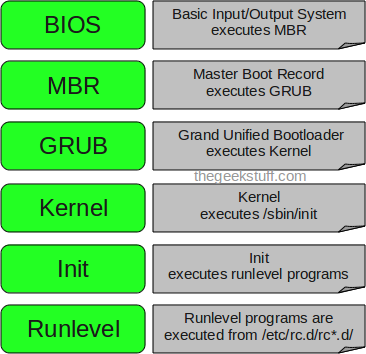
1. BIOS
- BIOS stands for Basic Input/Output System
- Performs some system integrity checks
- Searches, loads, and executes the boot loader program.
- It looks for boot loader in floppy, cd-rom, or hard drive. You can press a key (typically F12 of F2, but it depends on your system) during the BIOS startup to change the boot sequence.
- Once the boot loader program is detected and loaded into the memory, BIOS gives the control to it.
- So, in simple terms BIOS loads and executes the MBR boot loader.
2. MBR
- MBR stands for Master Boot Record.
- It is located in the 1st sector of the bootable disk. Typically /dev/hda, or /dev/sda
- MBR is less than 512 bytes in size. This has three components 1) primary boot loader info in 1st 446 bytes 2) partition table info in next 64 bytes 3) mbr validation check in last 2 bytes.
- It contains information about GRUB (or LILO in old systems).
- So, in simple terms MBR loads and executes the GRUB boot loader.
3. GRUB
- GRUB stands for Grand Unified Bootloader.
- If you have multiple kernel images installed on your system, you can choose which one to be executed.
- GRUB displays a splash screen, waits for few seconds, if you don’t enter anything, it loads the default kernel image as specified in the grub configuration file.
- GRUB has the knowledge of the filesystem (the older Linux loader LILO didn’t understand filesystem).
- Grub configuration file is /boot/grub/grub.conf (/etc/grub.conf is a link to this). The following is sample grub.conf of CentOS.
#boot=/dev/sda
default=0
timeout=5
splashimage=(hd0,0)/boot/grub/splash.xpm.gz
hiddenmenu
title CentOS (2.6.18-194.el5PAE)
          root (hd0,0)
          kernel /boot/vmlinuz-2.6.18-194.el5PAE ro root=LABEL=/
          initrd /boot/initrd-2.6.18-194.el5PAE.img
4. Kernel
- Mounts the root file system as specified in the “root=” in grub.conf
- Kernel executes the /sbin/init program
- Since init was the 1st program to be executed by Linux Kernel, it has the process id (PID) of 1. Do a ‘ps -ef | grep init’ and check the pid.
- initrd stands for Initial RAM Disk.
- initrd is used by kernel as temporary root file system until kernel is booted and the real root file system is mounted. It also contains necessary drivers compiled inside, which helps it to access the hard drive partitions, and other hardware.
5. Init
- Looks at the /etc/inittab file to decide the Linux run level.
- Following are the available run levels
- 0 – halt
- 1 – Single user mode
- 2 – Multiuser, without NFS
- 3 – Full multiuser mode
- 4 – unused
- 5 – X11
- 6 – reboot
- Init identifies the default initlevel from /etc/inittab and uses that to load all appropriate program.
- Execute ‘grep initdefault /etc/inittab’ on your system to identify the default run level
- If you want to get into trouble, you can set the default run level to 0 or 6. Since you know what 0 and 6 means, probably you might not do that.
- Typically you would set the default run level to either 3 or 5.
6. Runlevel programs
- When the Linux system is booting up, you might see various services getting started. For example, it might say “starting sendmail …. OK”. Those are the runlevel programs, executed from the run level directory as defined by your run level.
- Depending on your default init level setting, the system will execute the programs from one of the following directories.
- Run level 0 – /etc/rc.d/rc0.d/
- Run level 1 – /etc/rc.d/rc1.d/
- Run level 2 – /etc/rc.d/rc2.d/
- Run level 3 – /etc/rc.d/rc3.d/
- Run level 4 – /etc/rc.d/rc4.d/
- Run level 5 – /etc/rc.d/rc5.d/
- Run level 6 – /etc/rc.d/rc6.d/
- Please note that there are also symbolic links available for these directory under /etc directly. So, /etc/rc0.d is linked to /etc/rc.d/rc0.d.
- Under the /etc/rc.d/rc*.d/ directories, you would see programs that start with S and K.
- Programs starts with S are used during startup. S for startup.
- Programs starts with K are used during shutdown. K for kill.
- There are numbers right next to S and K in the program names. Those are the sequence number in which the programs should be started or killed.
- For example, S12syslog is to start the syslog deamon, which has the sequence number of 12. S80sendmail is to start the sendmail daemon, which has the sequence number of 80. So, syslog program will be started before sendmail.
There you have it. That is what happens during the Linux boot process.





 My name is Ramesh Natarajan. I will be posting instruction guides, how-to, troubleshooting tips and tricks on Linux, database, hardware, security and web. My focus is to write articles that will either teach you or help you resolve a problem. Read more about
Comments on this entry are closed.
Excellent……!!! 2011 seems to be rocking for TGS viewers….
@Ramesh: This is offtopic discussion. Could you write a article on ack. Thanks
you are rock,,, lol
nice,
Great article 🙂
You could also write few words about grub2 – configuration files for grub doesn’t work in grub2. (Tested in ubuntu)
very very nice,
tanx
Hello Ramesh,
It would have been better if if you could have explained more on each topic. Probably each high level boot process would need a separate page.
This doc is good for begineers.
Thanks,
Ajeya Krishna K R
Good Graphics
Great Tutorial
Keep it up
nice piece of information
thanks lot
Amazingggggggg good job Guys carry on
Thank u…
very well explained !!!!!!!!
Thanx alot…..
plz explain GRUB in detail…….How to use GRUB command prompt at system startup ??
These are very helpful. Keep ’em coming please!
Excellent !!! TGS Rocks…
thanks alot, just in time to futher clarify things lol..As always, TGS rocks!!!
I learn to much with your blog. Thank you.
Regards,
Júlio.
I know the terms GRUB, KERNEL,INIT, MBR. But i do not know how they work together. Thanks to Ramesh Natarajan, for his blog and useful posts.
Thank you RAMESH. this was so good…
The file that most would want is. The menu.list that is in the /boot/grub/ directory on my debian system. I often edit this file for a manual kernel update,time out,boot image change.
Short and Sweet
Really nice document for quick reference to Linux boot process!!!
Great article, thank you 🙂
Good one. Thanks.
plz explain about how to configure zimbra mail server and how to migrate sendmail to zimbra
An excelent article, I see another great article here.
This is very helpful I was looking for similar one..thanks
Great article Ramesh! But is not completely valid for Ubuntu, which use upstart. Nothing on /etc/inittab, for eg.
Good doc.
Thanks
Love this site, your explanations are excellent, and I like how you define terms and acronyms. Sometimes a man page can make my head spin – your site is the antidote to that – thanks!!
the best explanation ever …
thanks TGS
How many times did i ask myself how to find out order of linuxs’ start ?
when this time i saw your blog via TSG, i see thoroughly.
thanks a million
Best Regards
Robin Guo
Awesome !! For beginners helped a lot..
Excellent, in detail and simple. Thanks very much
Actaully i have failed in my first interview for not answering the above question,but after reading the above answer.i ensure i will get success.its really gud explanation,especially beginners lyk me.Thanks a lot
great article! very useful! thanks a lot.
really…….my total confuse remove after read this article.Thank you………….
Are you sure that “Depending on your default init level setting, the system will execute the programs from one of the following directories.” ?
For example my system is running on level 3 but executes VERITAS init scripts from rc2.d during the boot as well.
Very Nice.
Excellent !!!!!!!!!!!!!!!!!!!!!
Enough detail and simple .
Thanks very much
Best regard,
rajesh
good work fine to know how linux boot and the basic’s of the init run level’s only by ubuntu you have init s (single user) and init u (re run init) as extra
wow, your explaination is simple yet full with information
very helpful ! <3
greate usefull
I am flabbergasted.. I have made automation on these parts on S and K .,.. It was too Easy to understand this.. The person who post this.. is really a cool techie.. U rock man..
That was very useful information.
Thanks.
Excellent. keep it up..
Nice. Very useful
short and sweet and precise explanation
very good material and easy to understand …great work
Thanks dude, that was so helpful..
it’s very nice material…..i like it……..superb ………
HI this is very very useful information as interview point of view as well as for study how Linux boots. Great info Thank you very much Ramesh
Great and brief doc for Linux boot process. I truly liked it!!!
Thanx
Superb article with detailed information.
It is very nice article 🙂
how to create kickstart server in rhel 6.0
Excellent stuff from TGS!!!
gr8 article , got a lot of other info while reading this awesome stuff, thx alot
Great…very well explained…
Very nice, very neatly explained.
Keep on the work going
Nice Stuff !!
Thanks a lot !!
really…….my total confuse remove after read this article.Thank you………….
Good One, will be helpfull for new leaners!!!
excellent
Its very Good article and helpful for linux beginers
Excellent …
You can bypass the first three stage using kexec program for fast boot. This saves time when you have to reboot a lot for tuning system or handling init script.
Debian provides it as kexec-tools package.
Find the kernel options:
$ cat /proc/cmdline
BOOT_IMAGE=/vmlinuz-3.4.0-10.dmz.1-liquorix-amd64 root=UUID=07cf8c3a-d5a5-4b41-833f-16a9afebf70c ro quiet
Add a kernel image:
vmlinuz is the kernel image file I uses. If the kernel image uses initrd file, add –initrd option. Without it kernel will panic next boot.
$ sudo kexec -l /vmlinuz –append=”root=UUID=07cf8c3a-d5a5-4b41-833f-16a9afebf70c
ro quiet” –initrd=/initrd.img
Or
In my Linux box, boot partition is /dev/sda1
$ sudo kexec -l /vmlinux –append=”root=/dev/sda1 ro quiet” –initrd=/initrd.img
Start warm boot:
$ sudo kexec -e
Linux will boot up without going through BIOS, MBR, and Grub.
thanks
Excellent.., and thank you a lot..,
Excellent and simple explanation and a great deal for beginners !! Thank you.
very nice
Hi its excellent. Thanks.
thanks friend…….
what is 1st stage boot loader and what is 2nd stage boot loader ? kindly clear this point also.
I am working on Linux since decade. Some times I am unable explain the basic stuff like this. Thanks for explaining Ramesh Natarajan. Today onwards, I am the member of your fan club.
Thanks for this excellent article…………. 🙂
Hello,
Description is good and very easy to understand, thanks for this.
If possible please explain in detail about each and every config file or script, how is jumping from on script/config-file to another
Anyways I am happy for this post.
Thank you once more….
Excellent material. So simple to understand it. Doing a great job!!!!!
The Article is good And explained Simple …
tnx 4 this
Thanks for this excellent article……
its a superb article……….and simple and superb explanation.
This is really nice article. Appreciate your excellent work.
sir now i am using windows7 and linux in one computer.i dont want to use linux that have 250gb harddisk then how to boot(delete) a linux and how to plaace 250gb in windows7? Pls hlp me.
Thanks Mr.Linux natarajan
it was simply good.
thanks dude
good keep itup
Very Good Explanation.
Thank you very much .
Hey,you explained all,excellent.Thanks
Thanks Friend
thnkss ..very useful fo me..;) 😉
Great Man…..
its really useful.
Oh yes .. this is what i am seeking for .. something simple and effective ..
i don’t know why most people who talk about boot process and FHS love to make it
very difficult…
but you my friend .. u r brilliant .. this really easy and useful explanation ..
thanks as enormous as the sky
good explanation & easy to understand!!!
excellent, very well explained
Good article ….
awesome man, what a simply way to explain such a difficult process.,, thanks a lot,,keep going,,
Really Nice Article…. learn much from this…
Thanks
Thank you
Perfect article on Great topic.
Ramesh,
Thanks a ton for your efforts to provide such a excellent information by keeping it simple.
You rock man …… Keep it up…
nice job.any one can understand this . good explantion
Superb Article !!! Excellent explanation.
Keep it on.
I got confused by studying the process in another sites however this one is very easy to understand and remember.
i have littile bit confusion in bootprocessor .nw i clrd & esay to understand…
good article of boot processor
Thank you for simple, compact and clear explanation . . . 🙂
Good,Easy to understand and very useful for starters……..:)
good! the article is easy to understand,
very nice , thanks
Thanks for such a nice explanation…..
This article has cleared my all doubts.
Simple and Powerful.
Thanks.
Thanx a lot for ur great explanations buddy……………………..suprm performance
nw i hv nt any confusn
Good work, Thanks
excellent
Thanks bro … It is realy excellent and easy to understand
Thanks for sharing …good article to understand linux boot up process…………………
that is why lappy takes so much time for startup, actually this guy is busy in doing this or that, offcourse useful.
Thanks a lot. very nice….
Thanks much
Hi Ramesh,
This is the best explanation i’ve seen so far.
ThnQ very much,…
The role of initrd is not clear at all.
What does it contain?
Where does it come from?
When and how is it used?
Also the possibilities and methods to configure each step and its pieces are not
clear at all. We can change boot device (interactively or not), we can change the kernel (interactively or not), we can change the boot menu and give orders to grub….. can we change initrd? how? what for? and the init proces? inittab seems to be deprecated in Debian…..
“Programs starts with S are used during startup. S for startup.
Programs starts with K are used during shutdown. K for kill.”
or
The S set are the programs that are started when we enter in that runlevel and K is the set of programs that are killed when we enter in that runlevel?
Awesome Tutorial. Linux Boot Process Cleared Very Well.
Excellent Tutorial
Nice and well explained, thank you so much.
good one 🙂 great
Very well explained….! 🙂
i’m learning linux admin so any sugences pls give me and any learning text books and any meteriles
excellent… very well explained
The information here all seems correct, however I think you do a disservice to the reader not to mention that this is just one of many different ways to load Linux on a PC architecture. Other architectures use other methods, and there are other methods available on a PC architecture, and the version and configuration of the Linux kernel itself affects the boot process.
Thank you for a very clear presentation. I have one small comment, I went looking for the meaning of “MBR” and “initrd” before reading on to find you gave them later. May I suggest an expansion of the acronym in brackets immediately after the acronym. Thank you again very well done.
thanks soo much 🙂
The best consize and apt explanation i have read so far
Very well explained. But latest Ubuntu version 14.04 has some changes with respect to above explanation.
very nice …… so helpful.
you are awesome!
Excellent Article Admin – you simplify the words
TFS
Thanks your good article.
But linux Os (like Cent Os 7) dosen’t have grub.conf.
Please explaing the reason.
Sorry. I am beginner of Linux!
Thanks your favor!
Help me!
MBR is a bootloader ?
wow!i got too much information which was actually new for me. thank you sooo much.
nice experience, nice information, thank you so much.
Good one ……Thanks
Nice and well explained, thanks a lot ..:)
great one. it has given a simple procedure and best among all..
good explanation, also some newer linux kernels dont use init, only systemd
Thankyou Ramesh. That was so simply explained 🙂 !
How to change the runlevel if it is set to 0 or 6.
Good one… Thanks
Really good article on Linux boot process.
Excellent explaination……
Nice,Thanks !
Ultimate…thanks for sharing the transparency, simplicity and purity of Linux with such a simple Techincal Laguage
Good One Usefull…. Thank you
Hai It was awesome to read this. Thanks for your article.
It is really very useful
Thank you
Mahesh
Superb article.. its very useful to me…. thank u so much
Great article
doing great bro keep it up
Great article with vast information in short
Thanx
Nice piece of information
Thanks a lot
Thanks Bro,
Easy to understand amazingly explained.
Thanks for sharing
Appreciate it ✌.
Micro article.
its good Excellent explaination .
Good Article…
well explained . nice article. 🙂
great
Great article.
Thank you!
Awesome article with easy to understand explanation.’
A bit outdated though; would be good if you would keep the article updated.
Great historical reference, nevertheless.
very helpful !!!! Thanks alot 🙂
Well explanation..thank you so much