
In C programming language, the concept of pointers is the most powerful concept that makes C stand apart from other programming languages. In the part-I of this series we discussed the fundamental concepts around C pointers.
In this article, we will try to develop understanding of some of the relatively complex concepts. The following are explained in this article with examples:
- Constant pointer and pointer to constant.
- Pointer to pointer with an example
- Array of pointers with an example
- Pointer to functions with an example
1. C Constant Pointer and Pointer to Constant
As a developer, you should understand the difference between constant pointer and pointer to constant.
C Constant pointer
A pointer is said to be constant pointer when the address its pointing to cannot be changed.
Lets take an example :
char ch, c;
char *ptr = &ch
ptr = &c
In the above example we defined two characters (‘ch’ and ‘c’) and a character pointer ‘ptr’. First, the pointer ‘ptr’ contained the address of ‘ch’ and in the next line it contained the address of ‘c’. In other words, we can say that Initially ‘ptr’ pointed to ‘ch’ and then it pointed to ‘c’.
But in case of a constant pointer, once a pointer holds an address, it cannot change it. This means a constant pointer, if already pointing to an address, cannot point to a new address.
If we see the example above, then if ‘ptr’ would have been a constant pointer, then the third line would have not been valid.
A constant pointer is declared as :
<type-of-pointer> *const <name-of-pointer>
For example :
#include<stdio.h>

int main(void)
{
    char ch = 'c';
    char c = 'a';

    char *const ptr = &ch; // A constant pointer
    ptr = &c; // Trying to assign new address to a constant pointer. WRONG!!!!

    return 0;
}
When the code above is compiled, compiler gives the following error :
$ gcc -Wall constptr.c -o constptr
constptr.c: In function ‘main’:
constptr.c:9: error: assignment of read-only variable ‘ptr’
So we see that, as expected, compiler throws an error since we tried to change the address held by constant pointer.
Now, we should be clear with this concept. Lets move on.
C Pointer to Constant
This concept is easy to understand as the name simplifies the concept. Yes, as the name itself suggests, this type of pointer cannot change the value at the address pointed by it.
Lets understand this through an example :
char ch = 'c';
char *ptr = &ch
*ptr = 'a';
In the above example, we used a character pointer ‘ptr’ that points to character ‘ch’. In the last line, we change the value at address pointer by ‘ptr’. But if this would have been a pointer to a constant, then the last line would have been invalid because a pointer to a constant cannot change the value at the address its pointing to.
A pointer to a constant is declared as :
const <type-of-pointer> *<name-of-pointer>;
For example :
#include<stdio.h>

int main(void)
{
    char ch = 'c';
    const char *ptr = &ch; // A constant pointer 'ptr' pointing to 'ch'
    *ptr = 'a';// WRONG!!! Cannot change the value at address pointed by 'ptr'.

    return 0;
}
When the above code was compiled, compiler gave the following error :
$ gcc -Wall ptr2const.c -o ptr2const
ptr2const.c: In function ‘main’:
ptr2const.c:7: error: assignment of read-only location ‘*ptr’
So now we know the reason behind the error above ie we cannot change the value pointed to by a constant pointer.
2. C Pointer to Pointer
Till now we have used or learned pointer to a data type like character, integer etc. But in this section we will learn about pointers pointing to pointers.
As the definition of pointer says that its a special variable that can store the address of an other variable. Then the other variable can very well be a pointer. This means that its perfectly legal for a pointer to be pointing to another pointer.
Lets suppose we have a pointer ‘p1’ that points to yet another pointer ‘p2’ that points to a character ‘ch’. In memory, the three variables can be visualized as :
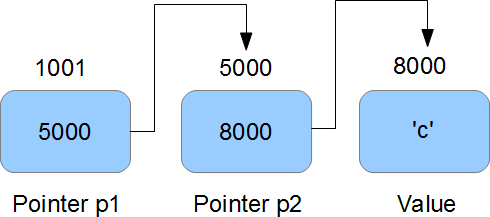
So we can see that in memory, pointer p1 holds the address of pointer p2. Pointer p2 holds the address of character ‘ch’.
So ‘p2’ is pointer to character ‘ch’, while ‘p1’ is pointer to ‘p2’ or we can also say that ‘p2’ is a pointer to pointer to character ‘ch’.
Now, in code ‘p2’ can be declared as :
char *p2 = &ch;
But ‘p1’ is declared as :
char **p1 = &p2;
So we see that ‘p1’ is a double pointer (ie pointer to a pointer to a character) and hence the two *s in declaration.
Now,
- ‘p1’ is the address of ‘p2’ ie 5000
- ‘*p1’ is the value held by ‘p2’ ie 8000
- ‘**p1’ is the value at 8000 ie ‘c’
I think that should pretty much clear the concept, lets take a small example :
#include<stdio.h>

int main(void)
{
    char **ptr = NULL;

    char *p = NULL;

    char c = 'd';

    p = &c;
    ptr = &p;

    printf("\n c = [%c]\n",c);
    printf("\n *p = [%c]\n",*p);
    printf("\n **ptr = [%c]\n",**ptr);

    return 0;
}
Here is the output :
$ ./doubleptr

 c = [d]

 *p = [d]

 **ptr = [d]
3. C Array of Pointers
Just like array of integers or characters, there can be array of pointers too.
An array of pointers can be declared as :
<type> *<name>[<number-of-elements];
For example :
char *ptr[3];
The above line declares an array of three character pointers.
Lets take a working example :
#include<stdio.h>

int main(void)
{
    char *p1 = "Himanshu";
    char *p2 = "Arora";
    char *p3 = "India";

    char *arr[3];

    arr[0] = p1;
    arr[1] = p2;
    arr[2] = p3;

   printf("\n p1 = [%s] \n",p1);
   printf("\n p2 = [%s] \n",p2);
   printf("\n p3 = [%s] \n",p3);

   printf("\n arr[0] = [%s] \n",arr[0]);
   printf("\n arr[1] = [%s] \n",arr[1]);
   printf("\n arr[2] = [%s] \n",arr[2]);

   return 0;
}
In the above code, we took three pointers pointing to three strings. Then we declared an array that can contain three pointers. We assigned the pointers ‘p1’, ‘p2’ and ‘p3’ to the 0,1 and 2 index of array. Let’s see the output :
$ ./arrayofptr

 p1 = [Himanshu]

 p2 = [Arora]

 p3 = [India]

 arr[0] = [Himanshu]

 arr[1] = [Arora]

 arr[2] = [India]
So we see that array now holds the address of strings.
4. C Function Pointers
Just like pointer to characters, integers etc, we can have pointers to functions.
A function pointer can be declared as :
<return type of function> (*<name of pointer>) (type of function arguments)
For example :
int (*fptr)(int, int)
The above line declares a function pointer ‘fptr’ that can point to a function whose return type is ‘int’ and takes two integers as arguments.
Lets take a working example :
#include<stdio.h>

int func (int a, int b)
{
    printf("\n a = %d\n",a);
    printf("\n b = %d\n",b);

    return 0;
}

int main(void)
{
    int(*fptr)(int,int); // Function pointer

    fptr = func; // Assign address to function pointer

    func(2,3);
    fptr(2,3);

    return 0;
}
In the above example, we defined a function ‘func’ that takes two integers as inputs and returns an integer. In the main() function, we declare a function pointer ‘fptr’ and then assign value to it. Note that, name of the function can be treated as starting address of the function so we can assign the address of function to function pointer using function’s name. Lets see the output :
$ ./fptr

 a = 2

 b = 3

 a = 2

 b = 3
So from the output we see that calling the function through function pointer produces the same output as calling the function from its name.
To conclude, in this article we touched some of the advanced concepts related to pointers. There can be some interesting problems related to pointers, which we might cover in some future article.





Comments on this entry are closed.
Hi,
This article is so good, I will print it out for my apprentice (and myself).
It would be nice if this blog had a ‘print this site with all pictures and the whole formatting’ option.
Best Regards,
cee
@cee
Thanks!!!
Very nice examples. Good work! I believe it would also be nice to cover some dynamic memory fundamentals using pointers (ie dynamic single and two-dimensional arrays). Also consider the possibility of covering this dynamic memory tutorial not only for C but also for the C++ language.
Yeah ! you’ve wrote it as you said before the end of january 😉 Thanks a lot for this article and your site in general.
The article is very nice..and useful as well.
If the uses mentioned then it would be more and more helpful.
Clearly explained.. Useful one !!
explanation and article both are very nice ……..:)
thnk u so much..ifor giving such difficult concept in a nice manner…
good explanation with examples……………..!!!thanks
Awesome article . hope will get advance article also ..
Thanks a lot. Really appreciate ur effort 🙂
Awesome work man…!!! I be gained my comfort level wid ptr by ur article…thanks..
Great article, it contained great detail and simple explanations of pointers.
Thanks.
u have explain the concept in nicely in manner,
easy to understand
Thanks for this article mayn!! really useful! I think I got what i needed for my interview!!
Thanks,
Best regards!!
hiiiiiiii
this article is really good it helps us lot in understnading pointer and its working
Thanks.
simple and clean!
Useful peace of info 🙂
I have learnt so much from geekstuff especially this made pointer concepts very clear!!
Thank you 🙂
Awesome!!!…Very good article with clear information.
Like to know few more advanced topics.!!Please point the similar links.
Hi
This Artical is very good and easy to understand
i want to know more advance concepts of pointer
if you have please send me on my emailid
Can you please suggest some good book to go into more detail of understanding and working on pointers?
concept is describedn in very simple way i like it
Great article! Thank you!
This article is easy to understand and very helpful…
Thanks a lot!!
#include
int main(void)
{
char **ptr=NULL;
char *p=NULL;
char c=”d”;
p=&c;
ptr=&p;
printf(“\n c=[%c] \n”,c);
printf(“\n *p=[%c] \n”,*p);
printf(“**ptr=[%c] \n”,**ptr);
return(0);
}
Nice explanation…
char ch, c;
char *ptr = &ch
ptr = &c
Hi everybody i want 5-10 questions and solutions in-depth on pointers please help me
“”
So we can see that in memory, pointer p1 holds the address of pointer p2. Pointer p2 holds the address of character ‘ch’.
So ‘p2′ is pointer to character ‘ch’, while ‘p1′ is pointer to ‘p2′ or we can also say that ‘p2′ is a pointer to pointer to character ‘ch’.
“”
You have a typo in this paragraph.
its p1 with is pointer to pointer to character ch not p2
Brief
And useful ,thanks alot!
Brief , to the point and very useful. thanks a Million.
Easy to understand pointers through this article.
Thank you very much for giving concepts of pointer that to in easy way. I like the way to put the example to under each concept of pointer,pointer to array,function pointers.
Thanks…:)
thanks!
Example and explanation both are goood…
if int variable holds 2 bytes than what should pointer int occupy?????????? i.e int a=5 means a occupy 2 bytes and int *a where a=&a; than what should *a occupy in memory???????????
Thanks
Thank you…a very neat explanation
what does this statement mean
int (*ptr)[3] = &a[0];
can u tell about pointer to an array i.e int (*p)[10];.and also performance between
array of pointers n pointer to an array
This article really helped. Thank You.
Nice and easy way to explain pointers..!! good job
Very nicely explained. This really helped.
int (*p)[10]; can u tell about pointer to an array in the same site. ur doing a good job…hatsoff…
Ok,i can ustand
Can you please implement the Inheritance concept in C using function pointer?
Above deceleration of every definition is very easy to understand……
nice job buddy……….
this is very gud can you tell me the other example more
above described ex are nice.but i advice you to provide much more examples.
yes it’s realy hlpful
thnks
realy it’s very nice………….
Good to begin with
simple and very easy to understand
superb!!! Easy to understand and very helpful as well..keep it up!
Thank you so much. Finally got a hang of the difference between the *ptr and the **ptr and the ***ptr.
Thank you very much
#include
int func (int a, int b)
{
printf(“\n a = %d\n”,a);
printf(“\n b = %d\n”,b);
return 0;
}
int main(void)
{
int(*fptr)(int,int); // Function pointer
fptr = func; // Assign address to function pointer
func(2,3);
fptr(2,3);
return 0;
}
you explain this concept . i am not understand what is the need of pointer to this function when func(2,3) does whatever we want to do ……….
can you give such example which explain in what setutation we should use pointer to function?????
it is good
aWsm…gr8…i got the idea abt pointer in just 15 mins…:)
nice explanation…of key points in pointers……
Thanks for such awesome explanation…
very nice example pointer programs .
nicee…very easy to understand
when i run function pointer example on my system it taks atleast 15s to execute,
why so and please give me link of your further articles on pointer
please make me understand about the output of program.
#include
void main()
{
static int a[3]={0,1,2};
int * p[]={a,a+1,a+2};
printf(“%u\n%u\n%d”,p,*p,*(*p));
getch();
}
vry good explanation about pointer to pointet
Good explaination .
nice explanation,………..you reali made it look easy…..
Thank you 🙂
very good explanation about pointers
Examples are good….
need more example which returns pointers…..
Please
Thanks a lot man!!!
these were some of the concepts which never get cleared…by my boring course book
i need more help on pointer . can you please advise me any good books on pointer
thanks a lot….
int rows = 2, col = 45;
ptr = (char **)malloc(sizeof (char) * rows);
int i;
for (i = 0; i < rows; i++)
{
ptr[i] = (char *)malloc(col* sizeof (char));
}
for (i = 0; i < rows; i++)
{
printf("Address of row-%d is %p\n", i, ptr+i);
}
for (i = 0; i < rows; i++)
{
printf("Enter Names\n");
scanf("%s", ptr[i]);
}
for (i = 0; i < rows; i++)
{
printf("Entered Names: %s\n", ptr[i]);
printf("Address(ptr[i]): %p\n", ptr[i]);
printf("Address(ptr+i): %p\n", ptr+i);
}
printf("ptr[1] – ptr[0] = %p\n", ptr[1] – ptr[0]);
Output:
Address of row-0 is 0x9132008
Address of row-1 is 0x913200c
Enter Names
sad
Enter Names
c
Entered Names: sad
Address(ptr[i]): 0x9132018
Address(ptr+i): 0x9132008
Entered Names: c
Address(ptr[i]): 0x9132050
Address(ptr+i): 0x913200c
ptr[1] – ptr[0] = 0x38 //Here expecting 0x2d (Col = 45) but why 0x38??
Not getting please let me know.
Thanks in advance
Your answer is good. I need example of pointer how is work and how point to one or more….
You forgot pointer to array.. Rest are very good explained…
Great. After struggling with the details arrays of functions I sorted
it out in a couple of hours,
All the best
Thankyou
John Walker
exclusive and crispy informations about c it’s fabulus!!!
Excellent article. One of the best and clearest explanations of pointers I have seen.
However, I may be mistaken but I think there is a typo in section “2. C Pointer to Pinter”.
I think the comment
“So ‘p2′ is pointer to character ‘ch’, while ‘p1′ is pointer to ‘p2′ or we can also say that ‘p2′ is a pointer to pointer to character ‘ch’.”
should be
“So ‘p2′ is pointer to character ‘ch’, while ‘p1′ is pointer to ‘p2′ or we can also say that ‘p1′ is a pointer to pointer to character ‘ch’.” ???
Thanks
Eminent article.
It clears my doubts about pointer to pointer
but will u describe what’s the difference between
const int *p and int const *p
Thanks
It is a helpful article to clear the basic concept on pointer..thanks
This article and the one before it on pointer was amazing. Thank you very much, cleared up everything I ever wanted to know about pointers.
its good explanation…. can you provide me where this pointer to functions are used?
awesome explanation of pointers
thankew!!!!
Hi
Explanation with ex is good
Thank You. Very much helpful article.
Good article that brings greater clarity on the topic of pointers. Thanks very much.
i want the answer to both array of pointer to a function
tanx a lot,,,, nice explanation
nice example
very nice
Dont you think the output of the third type (array of pointers) is wrong ?
You said that the array contains the address of the strings but your output does not shhow that
nice explaination 😉 …….. Thænk Ü
Very good explain
But i wont to know that
What is pointer to function ?
How can we explain it?
you have given very clear explanation.thanks for giving
Really clear explanation with simple examples..
i understood well basic things..
Thanks..
Clear concept in short.Very much helpful.Thank you .
This is really helpful stuff man. Looking forward to more.
THANKS
nice yrr
Very helpful. Thanks
Can you explain when we have to use pointer function. Because your given is not showing any meaning. Because if we call same function normally and we are getting same result then what is the necessary for pointer function. So please explain proper example with (when ,why, where with live example)